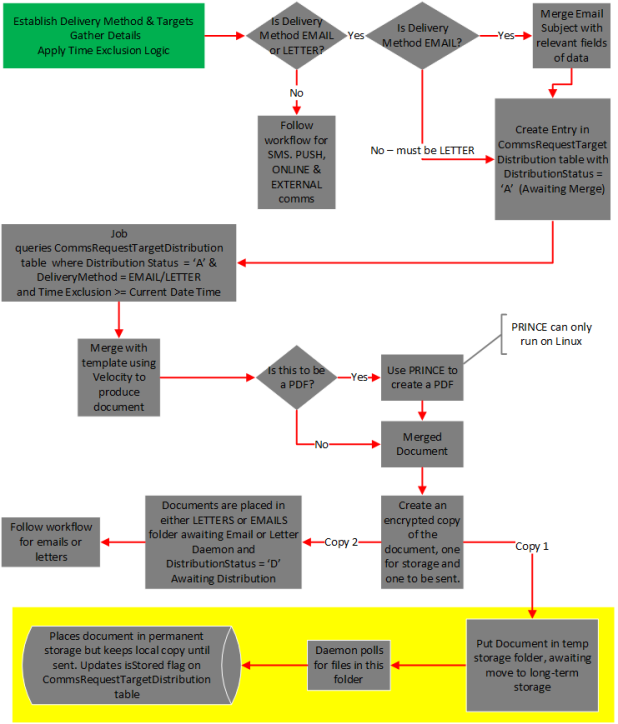
Comms Process Flow: Store Letters and Emails
Once the Comms Email Monitor or Comms Letter Monitor jobs have created a merged document from Velocity templates and default field values, they create two encrypted copies of the document. One is to be sent to the customer In the context of the Cloud Monetisation Platform, an individual or organisation who has signed an agreement to take goods and services from a service provider. A customer receives a bill associated with one or more subscriptions, and can be a single end user or a large company with many subscriptions assigned to one agreement., the other is to be placed in long-term storage.
The files to be stored are first placed in a temporary storage location by the job, as configured for the property for the sabre-comms module in the Administration Console An operations web console that allows batch jobs to be scheduled, run manually and monitored. The console also provides for viewing and modification of business and user applicable system configuration.: comms.document.storage.monitor.transmission.from.properties.dirname The files have a .done suffix.
The Transmission Comms to Document Storage daemon polls the temporary storage for .done files. The daemon moves these files to the location specified for the property: comms.document.storage.monitor.transmission.to.properties.dirname. This can be a remote location. The files are transmitted by SFTP. The hostname, port number, username and password used for transferring files by SFTP are set in the daemon properties. For more information, see Transmission Comms to Document Storage in the Communications Jobs and Daemons section.
The directory structure in which the documents are stored is automatically created. The naming convention for the directory includes the current date and time. The configured root folder in remote machine follows the convention: YYYY/MM/dd/HH/<Comms Req Document>, for example /permanentstorage/2018/08/02/17/5002761.pdf.
The daemon then updates the CommsRequestTargetDistribution table with:
- isStored = true
- FileLocation = location where the document is stored
If the transmission of a file fails, the daemon raises an error and stores the affected file in the location configured for the daemon property: comms.document.storage.monitor.transmission.from.options.moveFailed.
The highlighted portion of the following diagram illustrates the storage workflow for letter and email communications: